Lower LLM costs without lowering the bar.
An optimization run exploring cost–quality tradeoffs across prompt candidates, accelerated
Manual Prompt Tuning Does Not Scale.
You are trying to solve a multi-variable optimization problem by hand
Inflated Operational Costs
Your LLM bill is spiraling, but you're afraid to switch to a cheaper model because you can't guarantee quality won't drop.
Wasted Developer Time
Engineers spend days manually tweaking prompts; time that could be spent building new, value-driving features for your customers.
Unreliable Applications
Inconsistent or hallucinated outputs from your RAG pipeline are eroding user trust and creating significant business risk.
See the Best Trade-off for Your Target Model
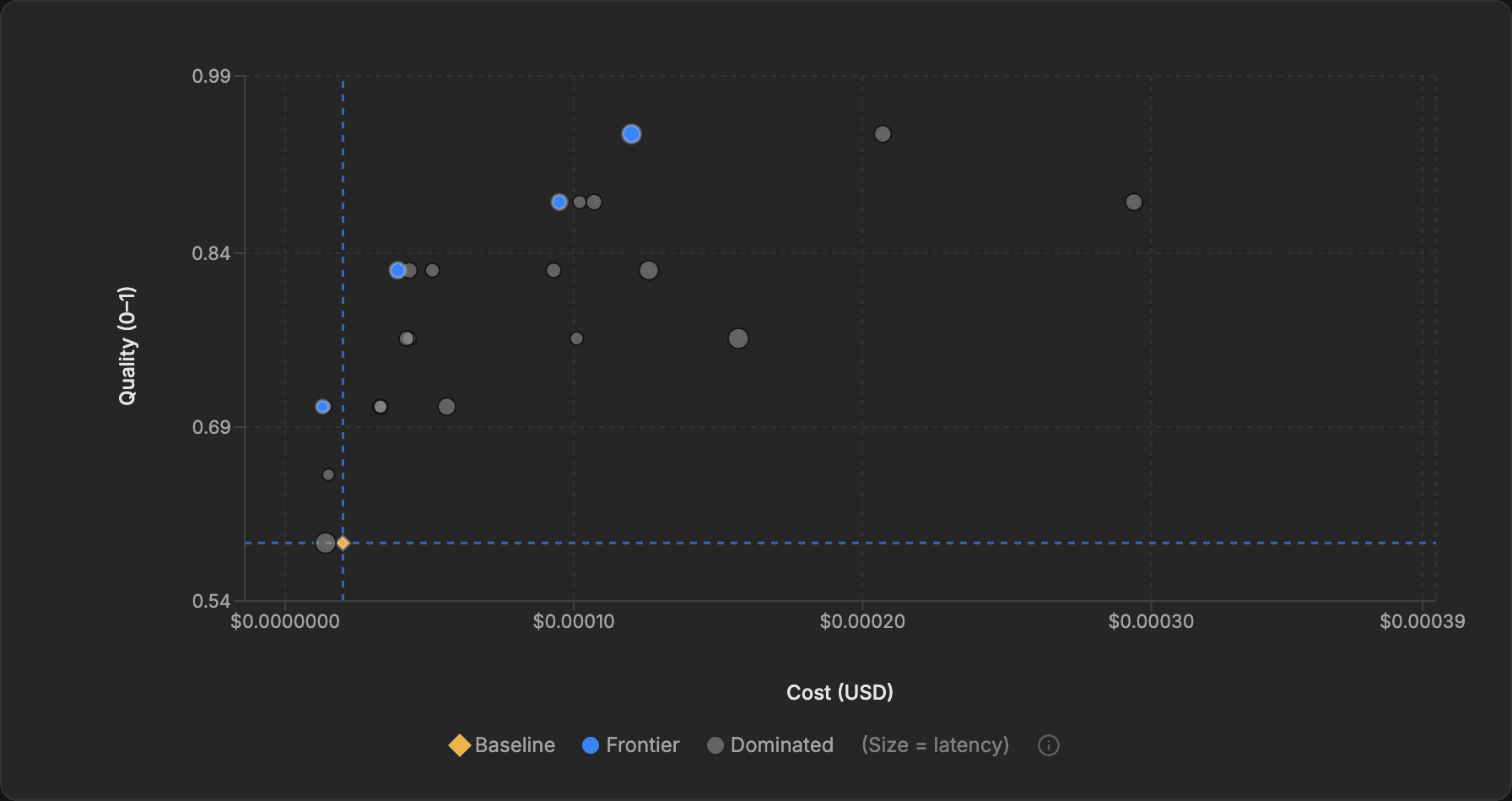
EigenPrompt introduces the Pareto frontier, a live 2D view of prompt candidates tested against your evaluation data. See the trade-offs between cost and quality, compare against your baseline, and choose with evidence. Use your own API keys, so prompts and evaluation data go only to providers you authorize.
1. Define Your Goal
Provide your evaluation dataset, your target LLM, and define what 'good' means for your use case.
2. Submit Your Prompt
Input the base prompt that you want to optimize.
3. Launch Optimization
Our engine automatically generates and tests hundreds of prompt variations.
4. Explore the Frontier
Watch the interactive Pareto chart evolve in real-time, explore the trade-offs, and spot evaluation data issues the optimizer surfaces along the way.
5. Select & Deploy
Click any point on the frontier to inspect the prompt and deploy the best-fit option for your use case.
Optimize and compare across 100+ models
Choose separate models for evaluation(the model you're optimizing for production) and meta operations (the model that generates prompt variations). This lets cheaper target models compete with prompts tuned for their strengths.
What a run can actually produce
A sample optimization run showing one baseline and multiple deployable trade-offs on the frontier.
Task
Entity matching
Evaluation
Quantitative, held-out validation
Dataset
120 labeled examples
Runtime
Standard run, about 8 minutes
Baseline
0.72
Current hand-tuned prompt
Best quality frontier point
0.91
Meaningfully higher quality, negligible cost increase
Best value frontier point
0.73
Near-baseline quality, 62% lower cost
The important point is not the exact numbers. It is that a single optimization run can surface more than one good answer: one prompt for maximum quality, another for bulk low-cost throughput, both measured against the same baseline.
Transform Guesswork into Guarantees
EigenPrompt is more than a text editor. It's a systematic optimization engine that helps you make confident trade-offs across cost, quality, and speed. If a run doesn't beat your baseline in at least one dimension, no credit is spent.
The EigenPrompt AdvantageMake Cheaper Models Viable
A cheaper model may fail with your current prompt, but succeed with one optimized for its strengths. EigenPrompt helps you find those cost-quality trade-offs with eval data.
- Systematically reduce LLM API costs
- Identify cheaper models that still pass your evals
- Get clear, quantifiable ROI on your AI spend
- Cut compute load and the energy footprint per request
Maximize Accuracy & Reliability
Move beyond inconsistent outputs. Systematically minimize hallucination rates and improve response quality to build user trust and reduce risk.
- Quantify and reduce hallucination rates
- Deploy AI features with predictable performance
- Catch dataset errors that silently cap your performance
Ship AI Features Faster
Replace weeks of manual, trial-and-error tuning with a single, automated optimization run. Free your engineers to build, not tweak.
- Automate the prompt engineering lifecycle
- Go from idea to production-ready prompt in minutes
- Compare models with Model Showdown without spending optimization credits
- Empower your team to innovate faster
The Optimization Layer for Modern AI
We think prompt optimization deserves its own layer in the stack: a place to improve prompts systematically for cost, quality, and reliability before they reach production.
What kind of tasks work best?
EigenPrompt is designed for single, well-defined LLM tasks within a larger workflow - tasks where success is clearly measurable.
Best Fit
Measurable, scoped tasks
Classification, extraction, summarization, tool calling, and other tasks where you can define what success looks like and test it repeatedly against real examples.
Not A Fit Yet
Tasks without a stable eval signal
Vague creative work, fully open-ended agents, or multi-turn systems where one prompt does not capture the real behavior. In those cases, start by building a better evaluation harness.
| Task type | Evaluation approach | Why it works well |
|---|---|---|
| Entity extraction | Quantitative (exact/fuzzy) | Clear right answers, easy to measure |
| Classification / routing | Quantitative (exact match) | Discrete categories, objective scoring |
| Summarization | Qualitative (LLM judge) - coming soon | Quality is subjective but rankable |
| Information extraction | Quantitative (substring) | Structured outputs, verifiable |
| Tool calling | Quantitative (Tool Call match) | Right tool scores half, exact arguments the rest |
| Content generation | Qualitative (judge + rubric) - coming soon | Define "good", let the judge score it |
Practical advice: If you are unsure where to start, pick the single prompt in your system with the clearest success criterion and optimize that first.
Frequently Asked Questions
Everything you need to know about EigenPrompt.
The sweet spot is a well-defined LLM task inside a workflow or agent: entity extraction, classification, summarization, tool-calling, and similar. You provide a way to measure quality (ground-truth data or a clear rubric), and EigenPrompt systematically finds prompts that perform better — often enabling a switch to a cheaper model at the same quality level.
Every model call carries a non-trivial error rate — hallucinations, format violations, subtle reasoning drift. For a single task with ground-truth data, that rate is quantifiable and reducible. But chain multiple calls without validation and correction at each step, and the errors compound: a five-step pipeline at 95% per-step accuracy lands below 80% end-to-end. At 90%, you're under 60%. The enthusiasm for autonomous agents chaining dozens of free-form LLM calls glosses over this arithmetic — without a deterministic oracle checking every intermediate output, long chains are unreliable at production scale.
EigenPrompt focuses on the lever that actually works today: making each prompt in your system as accurate and cost-effective as possible. That's the foundation that compounds in your favor — whether you're running a two-step pipeline or a twenty-step agent. Full agent-system optimization, where you bring your own evaluation harness and we optimize across the execution graph, is on our roadmap.
You get an interactive visualization so you can pick the exact trade-off that fits your use case. One credit, one run, one problem solved.
No evaluation setup is perfect — if the dataset is tiny, noisy, or repeatedly reused without refresh, confidence drops. We try to make those limits visible rather than hide them. Every prompt and evaluation dataset undergoes extensive automated QA as part of an optimization run.
To prevent leakage during search, failure-driven mutation hints and adversarial example generation are built from train failures only; test expected outputs never appear in the meta-prompts that propose new candidates, and a runtime guard rejects any run where the train and test sets would alias. Before optimization starts, automated dataset QA flags duplicate rows (which would inflate scores via implicit reuse) and a preflight pass catches labeling or format mismatches against your evaluator.
Honest limits: the held-out test set is re-scored on every promising iteration, so on small datasets with many iterations some compounding pressure on test scores is unavoidable — it’s a held-out set, not an oracle. We surface both the train and the test score for every candidate, so a large train-vs-test gap is visible rather than hidden. The strongest defense is dataset quality: 50–200 diverse, deduplicated, representative examples beats any algorithmic guard. If your eval set is tiny or skewed, no optimizer can fully compensate.
Qualitative evaluation (LLM-as-a-Judge) is coming soon. It will let one or more LLMs act as judges, guided by your optimization goal rubric - ideal for summarization, tone, creative writing, and reasoning quality where outputs are open-ended.
Rule of thumb: If you can write down the right answer, use Quantitative. If you can only describe what a good answer looks like, Qualitative will be the right fit once available.
EigenPrompt finds this frontier automatically. Instead of guessing which prompt balances cost and quality, you choose from a menu of proven trade-offs.
They show you how your prompts are performing. We find prompts that perform better. They’re complementary — use EigenPrompt to optimize, then deploy and monitor with your existing stack.
The biggest factor is dataset size — 50–200 examples is a good sweet spot for balancing speed, cost, and statistical confidence. Larger evaluation sets or higher sample counts can increase runtime beyond this range. We also provide Turbo-mode, which trades off some prompt quality and automated QA for speed. Compared to hours or days of manual prompt tuning, a single run gives you a data-backed answer fast.
In practice, we almost always find prompts that beat the baseline on cost, quality, or both. Higher optimization presets (Advanced, Max) explore more of the search space and tend to find larger improvements.
That said, we offer synthetic dataset generation so you can get started quickly. It’s useful for exploring the platform, but we always recommend real data for production decisions.
Need help designing an eval? Reach out — we’re happy to advise.
Your API keys are sealed separately in a passphrase-protected vault (Argon2id key derivation, AES-256-GCM encryption). They are excluded from run records, redacted from logs, and never sent back to the browser.
Deleted datasets and runs are soft-deleted immediately and hard-purged on a retention schedule. Account deletion purges all associated evaluation data and anonymizes your record.
We never sell your data; we use subprocessors and the LLM providers you authorize to deliver the service. See our Security page for the current subprocessor list.
What we process: Anonymized statistical patterns, scoring distributions, structural prompt metadata, optimization performance signals, and transient embeddings computed during processing and not retained.
What we never process: Your raw prompts, raw evaluation datasets, API keys, or any data that could identify you or your business.
What we never do: Sell your data, share it with third parties for their own purposes, or make automated decisions about your account based on individual data.
We use anonymized optimization metadata to improve our algorithms under legitimate interests. Your raw prompts, raw evaluation data, and API keys are never used for aggregate learning. You can object at any time in your Privacy Settings.
You can use different keys for the evaluation model (the one you’ll deploy) and the meta-model (the one that guides optimization). That separation lets you optimize for the model you want to deploy while using the best available model to guide the search.
You can mix and match providers freely. For example, optimize a prompt for a cheaper production model while using a stronger model to guide the search. The platform is model-agnostic by design.
API costs scale roughly linearly with your evaluation dataset size. As a rule of thumb: Advanced mode costs 2–5× Standard, and Max costs 5–10×. You set a maximum budget per run, so costs are always capped.
Join the waitlist to be notified when it launches.
Select Tool Call as the match type in the run wizard — there’s a one-click example to start from. v1 scores one tool call per example; multi-step tool chains are on the roadmap.
Still have questions? Contact us.