An account takeover, filed under billing. It waits there behind a stack of invoice questions while the attacker keeps working, until a human notices it's on the wrong desk and moves it to security. That's one misroute from an LLM-based support ticket router that's right 76% of the time wrong on one ticket in four, and the ones that hurt are easy to picture: the cancellation that never reaches the team paid to save it, the outage logged as a sales lead.
We pointed EigenPrompt prompt optimizer at that support router. It pushed accuracy from 76% to 92%, and turned up a separate, cheaper prompt template that still beat the original - around 40% cheaper to run. Then it found what no prompt could fix: some of the examples were incorrectly labelled, and other tickets it kept missing weren't wrong answers but wrong labels, or genuine coin-flips two reasonable people would route differently. Clean those labels up and the same target model reaches 97%.
A misroute in one frame: an account takeover, a login from a new country, sent to billing instead of security. The router reads each ticket and returns one desk. The rest of this study is about getting that one desk right more often.
Every prompt you run in production sits somewhere on a trade-off between quality and cost. A longer, more careful prompt usually scores better and costs more to run on every call; a terse one is cheaper and gives some accuracy back. Most teams never see that trade-off. They write a prompt, confirm it mostly works, and ship it, with no idea whether a cheaper version would do the job just as well or a slightly different one would do it far better.
EigenPrompt makes the trade-off visible. It rewrites and tests your prompt against your own data, scores every version on accuracy and on cost, and returns the set that no other version beats on both. On a customer-support ticket-routing task, it found a prompt that routed tickets more accurately than the one already in production and cost about 40% less to run. Pushed harder, it took the same task from 76% to 92% right-desk accuracy, with options all along the curve, and flagged the mislabeled and ambiguous tickets that were holding the score down in the first place. Fix the labels it flags, and the rest follows: on the cleaned data the optimizer reaches 97%.
What EigenPrompt does
EigenPrompt is systematic, multi-objective prompt optimization for teams shipping real LLM products. You give it a starting prompt, a set of labeled examples, and the model you want to run in production. It generates and tests prompt after prompt against your data, scores each one on quality and on dollar cost, and keeps the set where no prompt can be made more accurate without getting more expensive, or cheaper without getting less accurate. That set is the Pareto frontier, and you choose the point that fits your priorities.
Two things make the result trustworthy. It optimizes for the specific model you name, so the winning prompt is the one that works on the model you will actually pay for, not a general-purpose guess. And it splits your data, tuning on one part and scoring on a held-out part the prompts never saw, so the numbers it reports are closer to production than to a training-set best case. Your prompts and your data only touch the providers you authorize, and if it cannot beat your starting prompt, it does not charge you.
The example: routing support tickets
Ticket routing is a clean way to watch multi-objective optimization work. It is a classification problem with one right answer per ticket, it runs on every inbound message so the per-call cost compounds, and the cost of a wrong answer is concrete: a misrouted ticket reaches a human at the wrong desk and has to be re-triaged.
The example uses a sample customer-support routing dataset, published in the eigenprompt-resources repository: eight desks (billing, technical, account, sales, retention, security, compliance, and general) and 129 support tickets, each labeled with the desk it belongs to. The baseline is the prompt most people would write first: it lists the eight desks and asks the model for a single word back. On the held-out tickets it scored 76%. That is the number to beat.
A first run
We uploaded the 129 tickets as a CSV and set EigenPrompt to score on exact match, where the predicted desk either equals the labeled desk or it does not, which is exactly how routing works in production. We pointed it at the target model running the classifier and answered one question about the goal: maximize accuracy. This first pass used Standard mode. It finished in about 23 minutes and tested 104 distinct prompt variants.
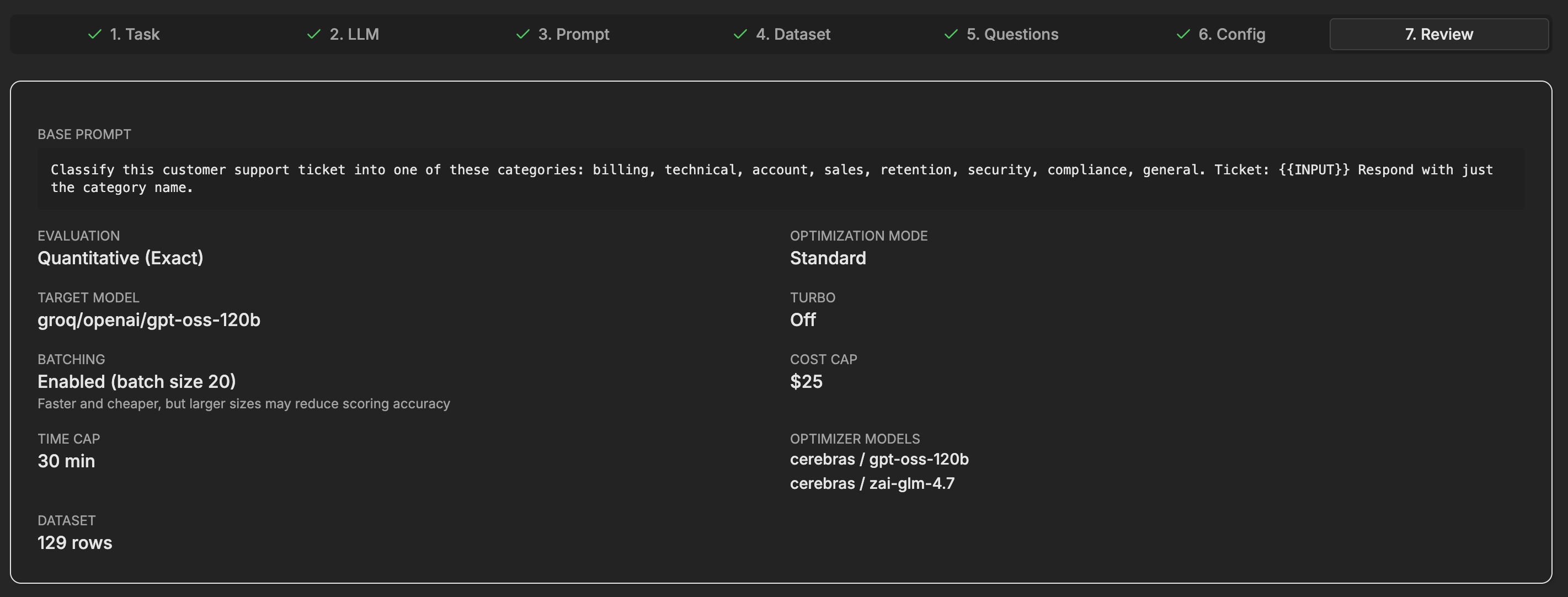
The run configuration: 129 tickets, exact-match scoring, the target model, Standard mode, with a cost cap and a time cap set up front.
It returned a frontier rather than a single answer. Plotted by cost and accuracy, the trade-off is easy to read: the gold marker is the baseline, the blue points are the frontier, and the grey points are dominated, beaten on both cost and accuracy by something on the frontier.
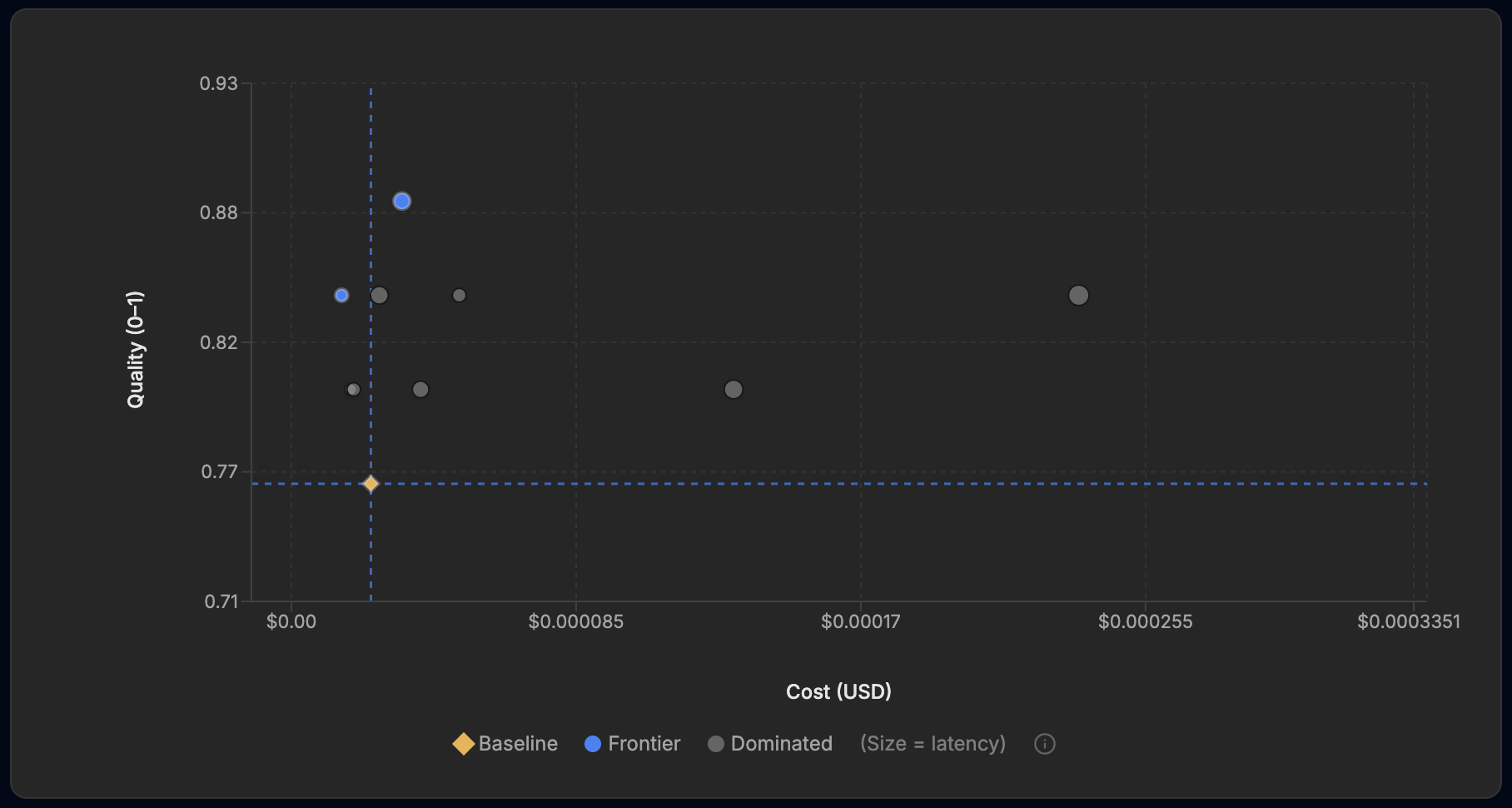
The Standard run's cost-versus-quality frontier. Cost on the x-axis, quality on the y-axis, point size scaled to latency. Gold is the baseline, blue is the frontier, grey is dominated.
The most accurate prompt on that frontier scored 88%, twelve points above the baseline, which on the 26 held-out tickets is three misroutes instead of six. It costs about $0.033 per thousand tickets to run, a little more than the baseline's $0.024, which is easy to justify when a single misroute costs far more than the inference. The interesting part is how it got there. It did not pile on rules. It got shorter, and added two precise tie-breaks:
Classify this customer support ticket into one of these categories: billing, technical, account, sales, retention, security, compliance, general.

Ticket: {{INPUT}}

Respond with just the category name.
Ticket: {{INPUT}}
Classify as billing, technical, account, sales, retention, security, compliance, general.
If cancel, downgrade, pause, or any churn risk → retention. If only payment method, invoice, billing dates or amounts → billing. Else primary intent. Output only the category.
Those two boundaries, churn to retention and payment-only to billing, were the ones causing the most misroutes, and EigenPrompt found them by testing against the data rather than by guessing. The frontier also carried a cheaper option: a terse one-line prompt that held 84% at about $0.015 per thousand tickets, roughly 37% less than the baseline and faster too. Same run, two defensible picks, depending on whether you care more about the cost of inference or the cost of a misroute.
right-desk accuracy, baseline to best, on held-out tickets
misroutes on the held-out set, down from 6
prompt variants tested, in about 23 minutes (Standard mode)
EigenPrompt also checks your data
A router can only be as accurate as the labels you score it against, and support exports are noisy. EigenPrompt surfaces that noise in two places, and it never changes a label on its own. It shows you the rows and leaves the decision to you.
Before a run, uploading a raw export triggers a quality check. On a deliberately messy version of this dataset it caught two tickets with identical wording but conflicting desk labels, an exact duplicate, and a fat-finger typo in a label ("billling"). All three come back as fix-these-first notes with recommended corrections, and the conflicting pair has to be cleared before the run, since the optimizer cannot score one ticket against two different labels.
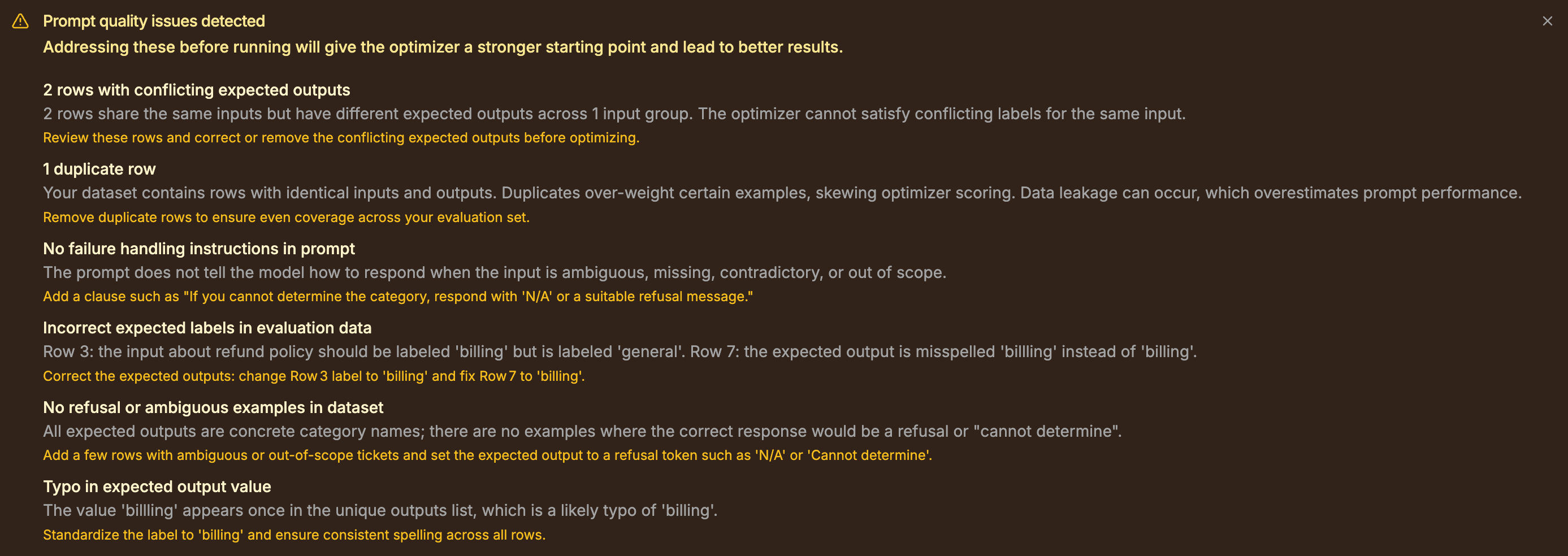
The preflight quality check on a raw export: conflicting labels, a duplicate row, and a misspelled label value flagged before any optimization spend, each with a recommended fix.
After a run, two tables do the work. Between them they list the tickets that few or no prompt variants could match to the stored label, and put the model consensus next to the label it was given. Three deliberately planted mislabels showed up exactly where they should:
- "Please cancel my subscription, I'm moving to a competitor" was stored as general. One variant out of 104 matched that label. The majority answer was retention, the desk that ticket should reach.
- "Someone logged into my account from another country and changed my password" was stored as account. Two variants out of 104 matched. The majority answer was security.
- "The app crashes every time I open the reports tab" was stored as billing. No variant matched it. Every candidate's answer pointed at technical.
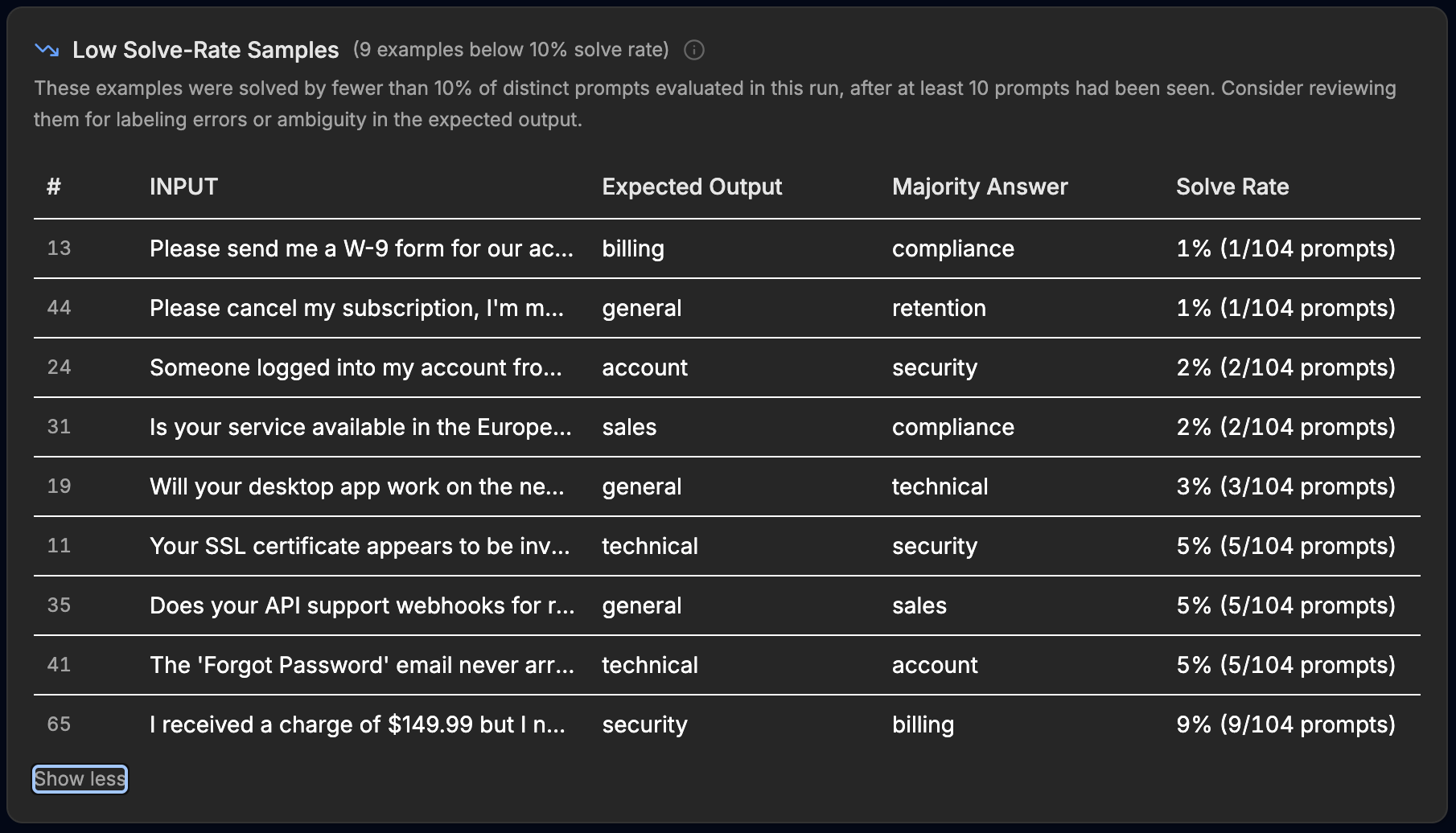
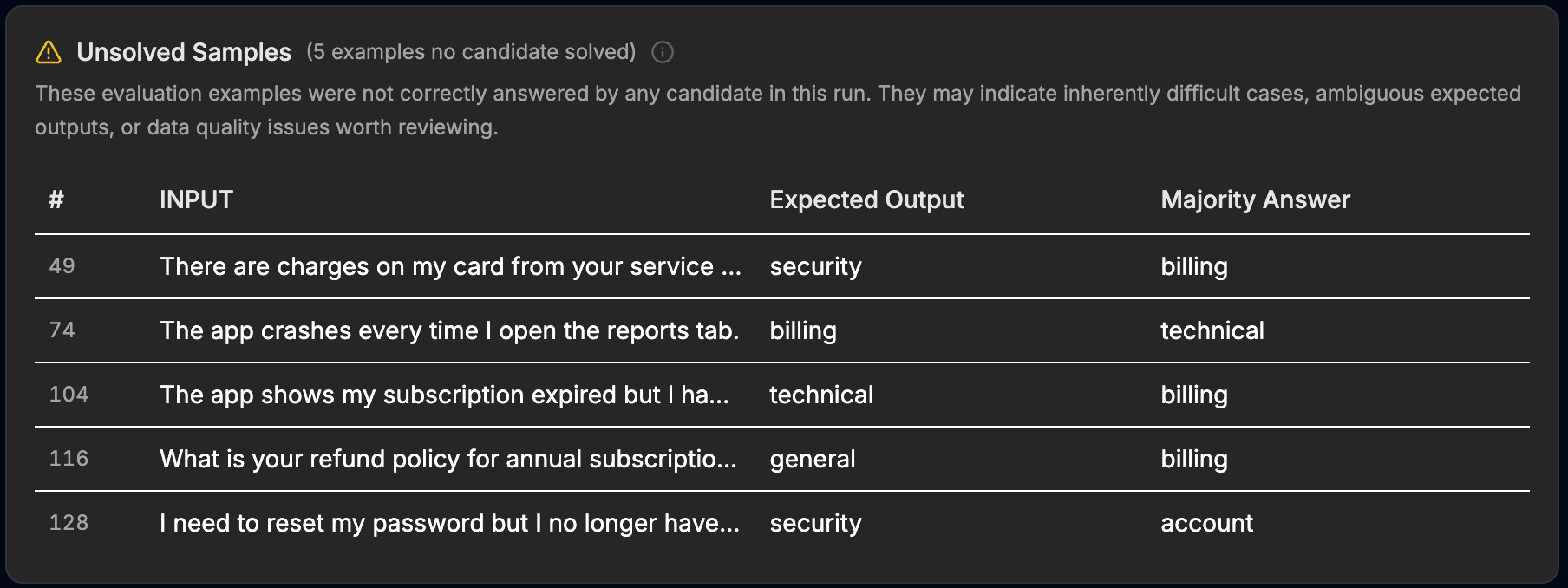
The post-run review surfaces. Each row puts the stored label next to the majority answer, with a solve rate in the low-solve-rate table, flagged for review for labeling errors or ambiguity.
The point is not that it found errors we planted. It is that the same tables flagged tickets nobody had marked: a W-9 request between billing and compliance, an unauthorized-charge ticket between security and billing, an availability question between sales and compliance. Some are genuinely ambiguous, like a "my subscription shows expired but I have a receipt" ticket that is defensible as either technical or billing. That is why this is a review queue and not an auto-correct. EigenPrompt surfaces the candidates; a person decides.
Max mode pushes the frontier further
Standard mode is one setting on a dial. EigenPrompt runs in four modes, from Efficient through Standard and Advanced up to Max, the most exhaustive search. The first run used Standard. Where that took about 23 minutes, the Max run worked for 1 hour 58 minutes on the same example, testing 382 distinct prompt variants, and the frontier moved.
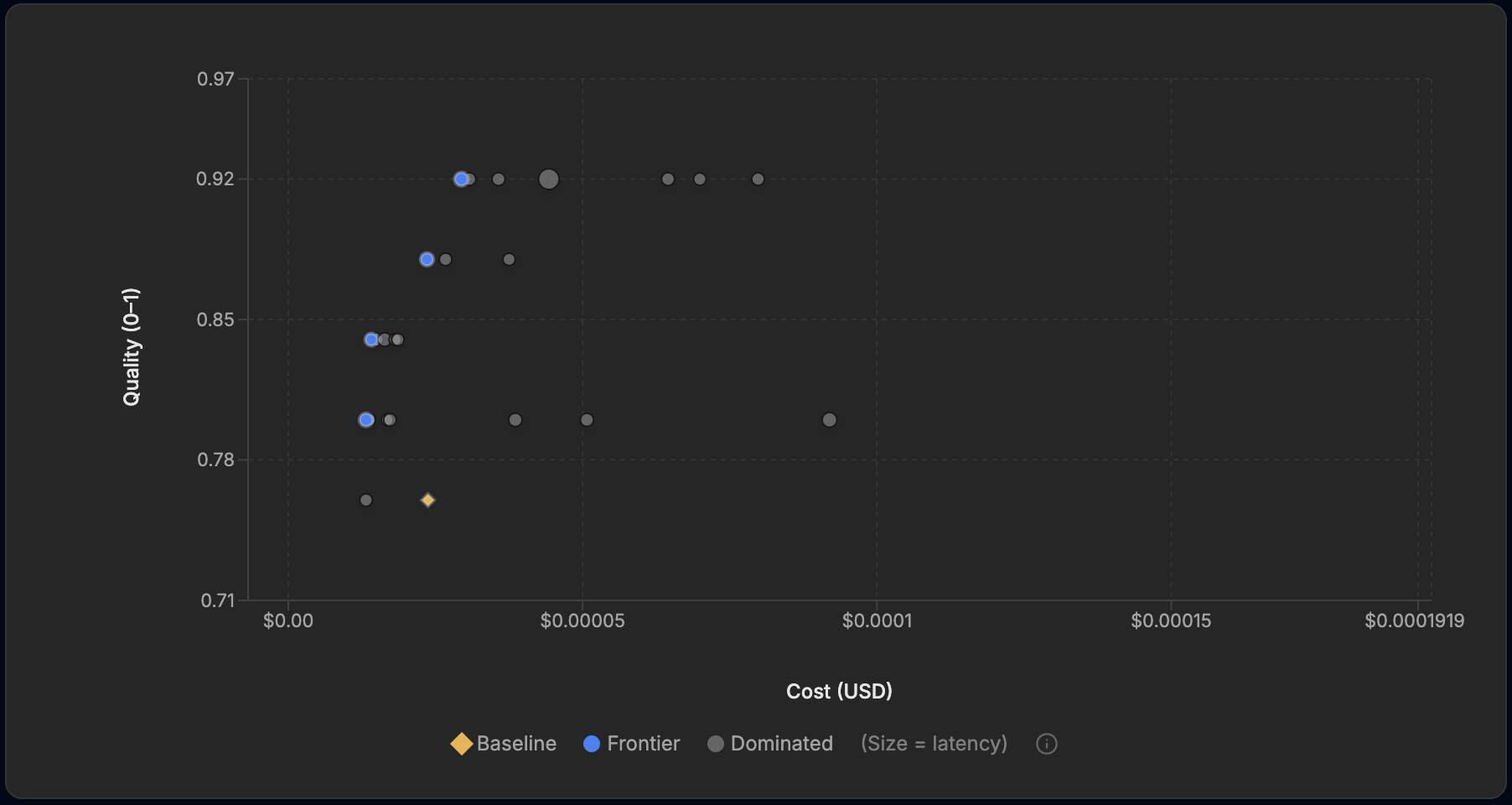
The Max run's frontier. The top point reaches 0.92, and the frontier offers cheaper prompts at each accuracy level than the Standard run did.
The most accurate prompt climbed to 92%, sixteen points above the baseline, which is two misroutes on the held-out set instead of six. The Max search did not only reach higher. It found cheaper prompts at every accuracy level than Standard had. The clearest case sits at 88%: where the Standard run's 88% prompt cost about $0.033 per thousand tickets, Max found an 88% prompt at about $0.024, the same per-ticket cost as the baseline.
At 88% accuracy, Max found a prompt that costs what the baseline costs. Twelve points of routing accuracy for no extra spend.
That is the whole point of a frontier: you pick the spot that fits. Maximum accuracy sits at 92%, for a fraction of a cent more per ticket. If you would rather not pay more, the 88% point matches the baseline's cost, and an 84% frontier point, still well above the baseline, comes in around 40% under it. The 92% prompt itself is again compact, a one-line cheat sheet that defines each desk in a few words, a format that would have been unlikely to occur to a human:
Label; return category. billing: invoices/payments/pricing; technical: bugs/errors; account: login/settings; sales: subscriptions/upgrades; retention: cancellations/downgrades; security: passwords/access; compliance: legal/policy; general: other {{INPUT}}
76% → 92%
right-desk accuracy in Max mode, sixteen points up
88% at baseline cost
Max found an 88% prompt at the baseline's per-ticket cost
~40% cheaper
an 84% frontier prompt, eight points above the baseline
The top of the frontier costs a little more per ticket than the baseline, about a quarter more, and runs a little slower, though still well under a cent a ticket. The frontier lays those choices out so you make them on purpose instead of by default.
The ceiling is your data!
Look closely at the tickets the 92% prompt still misses, and the study gives itself away: both are tickets the data-quality report had already flagged. One is the "subscription expired but I have a receipt" ticket the dataset itself marks as ambiguous; the model routes it to billing, which is defensible. The other asks for a refund policy, is stored as general, and reads to the model as billing — also defensible. Neither is an easy call fumbled. They are tickets two reasonable people would route two different ways. At the top of the frontier, the prompt has stopped failing; the labels have started.
If the misses are contestable labels rather than wrong answers, then the score was never measuring the prompt alone. It was measuring the data underneath it. So we took EigenPrompt's own advice: fixed the labels its report flagged, marked the genuinely ambiguous tickets for what they are, and ran the same models again without touching the prompt.
The first number is the tell. Scored against the cleaned labels, the original baseline prompt — not one word rewritten — climbs from 76% to 88%. Twelve points that were never the prompt's fault. They belonged to the labels, and they had been hiding inside the score the whole time, impossible to tell apart from a worse prompt.
Then the optimizer ran on the clean set and reached 97% accuracy on the cleaned evaluation dataset. All tickets flagged as 'ambiguous' can now be routed to a human to make the call on which desk should deal with it.
Fix the labels EigenPrompt flags, mark the ambiguous tickets as ambiguous, and the distance to perfect collapses.
This is the conclusion the run makes hard to avoid, and the most useful thing optimization can hand you. The ceiling on this task is the quality of your labels, and EigenPrompt locates it from both sides at once: the best prompt for the data you have, and the exact rows standing between that prompt and a clean sweep. The accuracy you cannot reach is not a smarter model you have yet to buy or a cleverer prompt you have yet to find. It is a definition your team has not finished writing.
the same baseline prompt, unchanged, once the flagged labels are fixed
Max accuracy on the cleaned set, up from 88%
EigenPrompt answers two questions scientifically: It turns "is our prompt good enough?" into a measurement, and "why is it not better?" into a short, finite list of data quality improvements you can work through. The final, high-quality prompt including the ambiguous category was as follows:
Classify the ticket into one category.

CATEGORIES:
- billing: invoices, payments, refunds, pricing, failures.
- technical: bugs, outages, errors, API, performance.
- account: profile, password reset, login, email change, permissions.
- sales: pre‑purchase, demo, new subscription, upgrade.
- retention: cancel, downgrade, pause, churn risk.
- security: unauthorized access, phishing, compromised, 2FA.
- compliance: GDPR, CCPA, legal, audit, data deletion.
- general: feedback, compliments, casual.
- ambiguous: unintelligible, noise, insufficient context.

RULES:
- Keywords: hacked/breach→security; GDPR/legal→compliance.
- Intent: buy/upgrade/demo→sales; cancel/downgrade→retention; money/invoice→billing; error/bug→technical; profile/login→account (except “someone else logged in”→security).
- Nonsense→ambiguous; else→general.

Ticket: {{INPUT}}
Category: (respond only with category name)
What this gives you
The example is ours; the method is general. There is no single best prompt for a task, only a frontier of best trade-offs, and the only way to know where your prompt sits is to test it against your own labeled data on the model you actually run. Score it the way production scores it. For routing that means right-desk-or-not, single-word exact match, which sounds crude and is exactly right.
Optimize for the model you actually run, not models in general. A prompt tuned for one model is rarely the best prompt for another, because their instruction-following and failure modes differ, so when you switch models you re-run rather than carry over a prompt shaped for the old one.
Expect label noise, and treat the rows your prompts keep disagreeing with as the first place to look. Some will be errors and some will be definitions your team needs to settle. Re-test whenever the task changes, because adding a desk or a category quietly changes the right answer for tickets that already exist. Multi-objective optimization is what turns all of that from a guess into a measurement.
Try it
EigenPrompt is the tool behind every number above. Point it at your own prompt, your own labeled examples, and the model you run in production, and see where your Pareto frontier sits.
If you would rather have it done with you, the 5x Performance team works with companies to take a working LLM system and find the version that is measurably better against their own data, with the trade-offs made explicit instead of guessed.