Stop guessing.
Start optimizing.
EigenPrompt tests prompt variations against your evaluation data so each target model gets a fair shot before you decide what to deploy. Find the cheapest model that still performs - with data, not guesswork. Bring your own keys - your prompts and eval data only ever touch providers you authorize.If performance doesn't improve in at least one dimension, no credit is charged.
Get startedManual prompt tuning doesn't scale
Every team building with LLMs hits the same wall. You write a prompt, it works okay, and then you spend days tweaking it - rephrasing instructions, adjusting examples, restructuring output formats - trying to squeeze out better results.
LLM Engineers
Building classification, extraction, or summarization into a product? Replace guesswork with data on which prompt actually performs best.
Engineering Managers
Your team is spending days on prompt tuning instead of shipping features. EigenPrompt condenses that work into a 10-20 minute automated run.
CTOs & Product Leaders
Concerned about LLM costs at scale? See the exact trade-off between quality and cost - quantified, not guessed.
From prompt to Pareto frontier
You provide your current prompt, a target model, and an evaluation dataset. EigenPrompt systematically generates and tests variations, then shows the best cost-vs-quality trade-offs for that model.
Define what "good" looks like
Provide an evaluation dataset - example inputs paired with expected outputs. This is the yardstick EigenPrompt uses to measure whether a variation is actually better, not just different. A good first dataset has 50-200 examples. Upload a CSV; beta synthetic generation can draft a starter dataset, but use real examples for production decisions.
Provide your prompt
Paste in the prompt you're currently using. If it has variable placeholders (like {{customer_name}} or {{document_text}}), EigenPrompt detects them automatically and maps them to your dataset columns.
Choose your model and go
Select your LLM provider and model, pick an optimization preset, and launch. Using your own keys, EigenPrompt routes prompts and evaluation traffic only to the providers you approve. Results stream to your browser in real time.
| Preset | Iterations | Best for |
|---|---|---|
| Standard | 8 | Quick exploration, most use cases |
| Advanced | 12 | Deeper search with higher cost budget |
| Max | 15 | Thorough optimization for production-critical prompts |
Pick the best-fit prompt and deploy
Click any point on the Pareto frontier to inspect the full prompt text, its quality score, cost per call, and latency. Choose the best-fit option for your use case, then copy it in one click and drop it into your application.
The Pareto frontier, explained
You want the best quality at the lowest cost. No single prompt wins on both - the most accurate ones use more tokens and cost more. But there's a set of prompts where you can't improve one dimension without worsening the other. That set is the Pareto frontier, and it contains every worthwhile option.
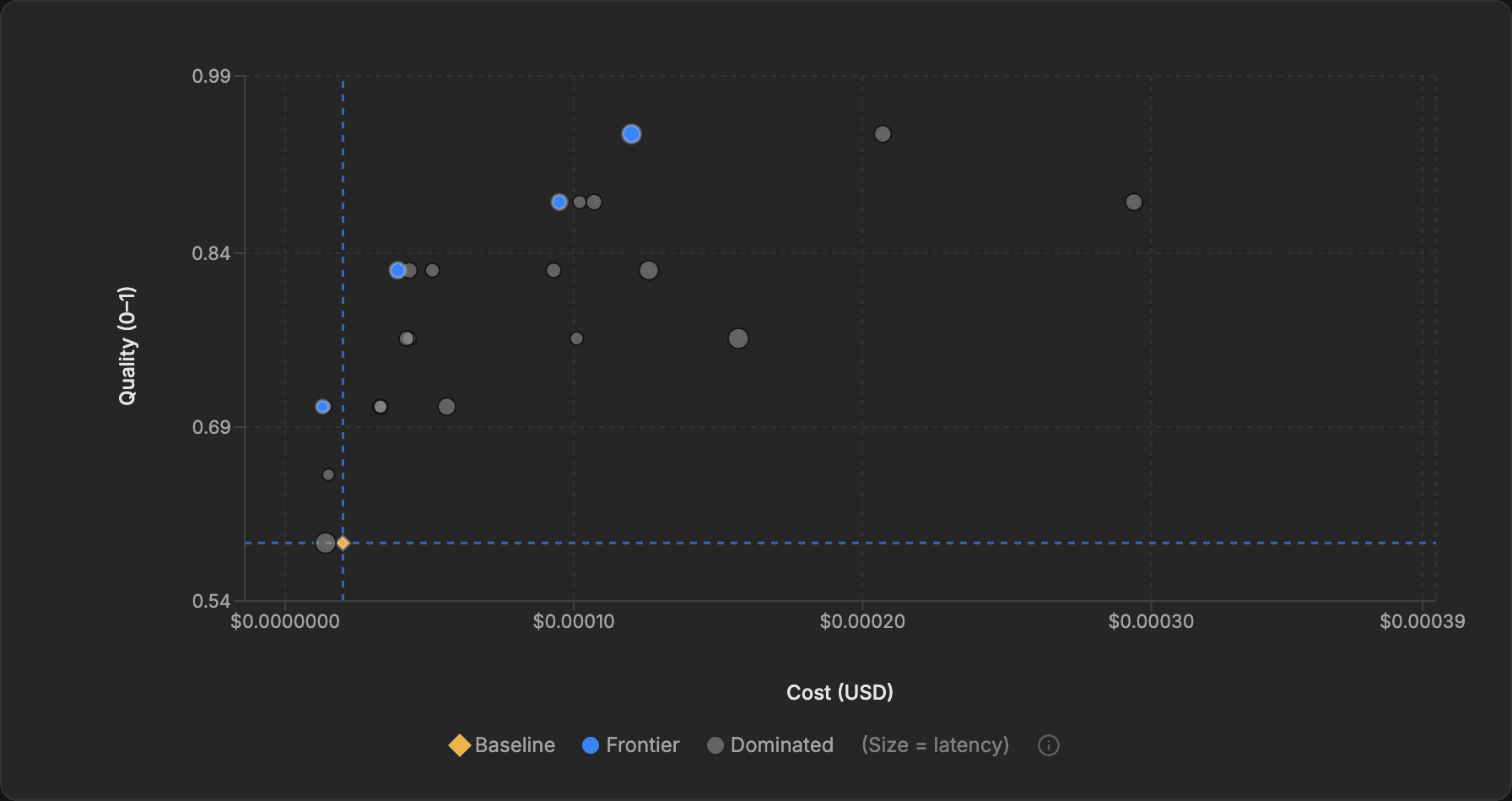
Every blue point represents a prompt that can't be beaten on both cost and quality at once. The grey points are dominated: somewhere on the frontier is a prompt that is cheaper at the same quality, better at the same cost, or both. Your original prompt appears as a diamond baseline marker, so you can see the available headroom at a glance.
Entity resolution in 8 minutes
A data engineering team used EigenPrompt to optimize their entity-matching prompt - a common task where small prompt differences measurably affect accuracy and cost. One Standard run (7 iterations, ~8 minutes) produced:
Baseline
0.72
accuracy
Best Quality
0.91
accuracy · +26%
Best Value
0.73
accuracy · -62% cost
Both improved prompts sat on the Pareto frontier. The team deployed the high-accuracy variant for their production pipeline and the cheap variant for bulk data cleaning jobs. Two prompts, two use cases, one optimization run.
Intelligence arbitrage
Most teams pick an expensive model, write a prompt for it, and then try the same prompt on a cheaper model when costs get uncomfortable. Quality drops. They conclude the cheaper model “isn't good enough” and go back to overpaying.
The hidden assumption
That quality drop isn't inherent to the cheaper model - it's because the prompt wasn't written for it. Every model has different instruction-following patterns, context sensitivities, and reasoning strengths. A prompt optimized for GPT-4o exploits GPT-4o's specific behaviors. Hand it to Claude Haiku or Gemini Flash and you're leaving their actual capabilities untapped.
What arbitrage actually looks like
Real model arbitrage means finding, for each model, the prompt that unlocks its maximum performance - then comparing those optimized ceilings against cost. The results are consistently surprising: a $0.15/M-token model with a tailored prompt frequently matches or beats a $15/M-token model running a generic one. The performance gap between models is often smaller than the performance gap between a good prompt and a bad one on the same model.
Why you can't do this by hand
Optimizing a single prompt for one model already involves hundreds of variations. Doing it across three or four candidate models - each with their own optimal prompt style - is combinatorially impractical to do manually. This is exactly what automated optimization unlocks: run the same task against multiple models, let EigenPrompt find each model's best-fit prompt independently, then compare the Pareto frontiers side by side. You're no longer comparing models - you're comparing each model at its best.
The prompt is the variable, not the model. Teams that optimize prompts per model routinely unlock 50–95% cost reductions at equivalent quality - not by compromising, but by discovering that a well-prompted smaller model was always capable of the task. Lower compute means a smaller energy footprint per request.
Your data has bugs too
During optimization, hundreds of prompt variations evaluate every example in your dataset. When nearly all prompts disagree with the expected output, it usually means the label is wrong - not the prompts.
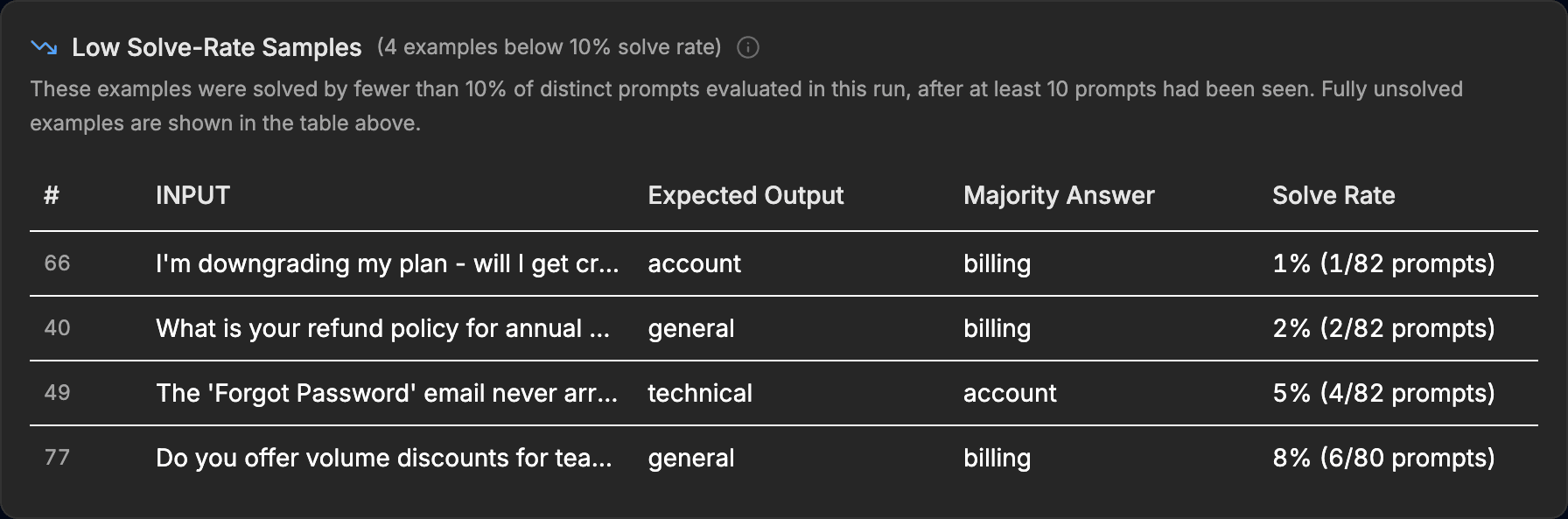
Here, the expected labels say “account” or “general” but the majority of prompts consistently answer “billing.” This kind of labeling error silently caps optimization performance - EigenPrompt catches it automatically.
What happens behind the scenes
When you launch a run, EigenPrompt doesn't just randomly rewrite your prompt. It uses a multi-strategy optimization loop that learns from each iteration:
Baseline evaluation
Your current prompt is evaluated against the full dataset to establish a performance anchor.
Variation generation
Dozens of strategies are applied - improving accuracy, cutting token count, restructuring reasoning flow - to produce candidate prompts.
Training-set screening
Each variation is tested on a training subset first. A preflight check catches obviously broken variants before wasting evaluation budget.
Held-out validation
Surviving candidates are evaluated on a held-out test set for reliable scoring. Only non-dominated candidates are retained.
Iterate & refine
The system learns from what worked and generates smarter variations each round. Batching (multiple examples per LLM call) keeps optimization costs low.
What kind of tasks work best?
EigenPrompt is designed for single, well-defined LLM tasks within a larger workflow - tasks where success is clearly measurable.
| Task type | Evaluation approach | Why it works well |
|---|---|---|
| Entity extraction | Quantitative (exact/fuzzy) | Clear right answers, easy to measure |
| Classification / routing | Quantitative (exact match) | Discrete categories, objective scoring |
| Summarization | Qualitative (LLM judge) - coming soon | Quality is subjective but rankable |
| Information extraction | Quantitative (substring) | Structured outputs, verifiable |
| Tool calling | Quantitative (Tool Call match) | Right tool scores half, exact arguments the rest |
| Content generation | Qualitative (judge + rubric) - coming soon | Define "good", let the judge score it |
Less suited:Open-ended creative writing with no evaluation criteria, or highly interactive multi-turn conversations where a single prompt doesn't capture the full picture.
Optimize and compare across 100+ models
Choose separate models for evaluation(the model you're optimizing for production) and meta operations (the model that generates prompt variations). This lets cheaper target models compete with prompts tuned for their strengths.
Simple, credit-based pricing
One credit = one optimization run for one target model. Monthly credits and checkout prices stay on the live Pricing page so they always match what you see at purchase. The table below lists the platform entitlements that are enforced in-app.
LLM inference costs go through your own provider accounts - the platform estimates total LLM cost before each run, and you set a maximum budget ($1–$1,000).
| Plan | Evaluation examples (max) | Optimization modes |
|---|---|---|
| Evaluation | 100 evaluation examples | Efficient, Standard |
| Pro | 500 evaluation examples | Efficient, Standard, Advanced |
| Business | 1,000 evaluation examples | Efficient, Standard, Advanced, Max |
Improvement guarantee:If EigenPrompt doesn't find a prompt that improves on your baseline in at least one dimension, no credit is spent automatically - no support ticket required.
Model Showdown:Compare multiple models on the same prompt, task, and dataset without spending optimization credits. It's a fast way to spot promising cheaper models before you run model-specific prompt optimization.
How your data is protected
A healthy dose of scepticism when a platform asks for your API keys and evaluation data is entirely reasonable. Here's exactly what happens.
You bring your own API keys. EigenPrompt doesn't resell API access or proxy through shared accounts. Usage appears on your own provider dashboard, your rate limits apply, and you can revoke access at any time by rotating your keys.
We never sell your data. We use vetted subprocessors to operate the service and the LLM providers you authorize to run your prompts.
API key handling: Saved keys live in a passphrase-protected vault: Argon2id key derivation, a per-account key bound to a separate server secret, and AES-256-GCM authenticated encryption. Keys are decrypted just-in-time to run your optimizations, held in memory only for the duration of the run, excluded from run records, redacted from logs, and never sent back to the browser.
Evaluation data encryption: Your datasets and run data are encrypted at rest with per-account AES-256-GCM keys derived via HKDF. Deleted datasets and runs are soft-deleted immediately and hard-purged on a retention schedule. Account deletion purges all associated data and anonymizes your record.
Up and running in five minutes
Sign up at eigenprompt.ai and choose a subscription plan; evaluation examples limits and optimization modes follow the plan tier you select.
Store your API keys in Settings - encrypted and passphrase-protected.
Create a new optimization - a guided wizard walks you through every step.
Upload your eval dataset as a CSV, or generate a synthetic one to experiment.
Launch the run and watch the Pareto frontier build in real time.
Pick the best-fit prompt for your use case and deploy it.
Your prompts, optimized.
No black boxes. No lock-in. Your keys, your models, your data, your choice.
Get started