Back to all posts
EigenPrompt Explainer

EigenPrompt Explainer: Step-by-step guide to LLM-powered entity resolution

The EigenPrompt Team
June 2026
12 min read

Somewhere in your bank statement is a line like KLARNA* HMSVERIGE SE SEK. It's an H&M purchase. Every budgeting app, expense tracker, and fraud model has to decode lines like that into merchant names, millions of times a day, and the obvious prompt for the job gets 64% of our labeled examples right. So we pointed EigenPrompt at it and let it search. The winning prompt scores 81%, fits on one line, and costs 41% less per call than the one it replaced. Finding it took 41 minutes and about 80 cents of API spend.

This article shows how we applied EigenPrompt to that entity-resolution problem, compares its three optimization modes on the task, and then walks you step by step through conducting a Standard optimization run of your own.

67% → 83%

evaluation accuracy, baseline to best, in the Advanced run

36%

of base cost for the cheapest Standard frontier prompt, which still beat the baseline's accuracy

187

prompt variants tested across the Efficient, Standard, and Advanced runs

One scope note before we start: for this demo we deliberately used only low-cost, mid-tier models — an open-weight gpt-oss-120b served on Groq as the target, with two fast open-weight models doing the optimizing. The method is identical on bigger models; it just costs more to run.

The problem: primary merchant extraction

The task sounds simple: read a transaction descriptor and return one merchant name.

Transaction: TST*BLUE BOTTLE UNION SQ
Expected output: Blue Bottle Coffee

But the hard cases are exactly the ones that show up in real statements, and every one below is a row in the dataset we used:

  • A processor is visible, but the processor is not the merchant: STRIPE* LINEARAPP INC is Linear.
  • App-store billing hides the underlying service: APPLE.COM/BILL DUOLINGO is Duolingo, not Apple.
  • A delivery platform is the actual counterparty: UBER EATS *TACOBELL 312 resolves to Uber Eats, not Taco Bell.
  • A buy-now-pay-later rail stands in front of the retailer: KLARNA* HMSVERIGE SE SEK is H&M.
  • A rebrand sits half-finished in the descriptor: TWITTER BLUE X CORP SF CA is X.
  • Something that looks like line noise isn't: ACH PAYROLL ADPFIDES 12345 is ADP.

Two of those rules point in opposite directions: the delivery platform counts as the merchant; the app store doesn't. The labels take a position on every case like this, and the prompt's job is to learn that position, not argue its own.

The rule the prompt has to enforce: return the primary canonical merchant or service, and return Unknown when the descriptor doesn't contain enough evidence to name one.

The dataset

The example uses the entity_resolution dataset that ships with EigenPrompt:

examples/datasets/entity_resolution.csv
examples/datasets/entity_resolution.json

It has 140 rows and two columns: the raw descriptor and the expected merchant. The labels are picky on purpose. They want Dunkin' with the apostrophe, Apple TV+ with the plus, and Amazon Marketplace rather than just Amazon when that's what the descriptor says. Exact-match scoring means close doesn't count, which is also how a downstream system would consume this output.

The starting prompt is the one most people would write first:

Identify the primary merchant from this bank transaction description.

Transaction: {{INPUT}}

Output only the canonical merchant name (e.g., 'Amazon', 'Starbucks', 'Netflix').
If no merchant can be determined, output 'Unknown'.

Results upfront

We ran the same prompt, dataset, and target model (groq/openai/gpt-oss-120b) through three of EigenPrompt's optimization modes: Efficient, Standard, and Advanced. The Standard run improved accuracy from 64% to 81%, and its winning prompt costs $0.0151 per thousand calls against the baseline's $0.0254 — 17 points better and 41% cheaper at once. The Advanced run pushed the top score to 83% and turned up a one-line prompt twelve points above its baseline for less than half the baseline's per-call cost. Efficient, a five-minute pass, added five points for under fifty cents of API spend.

One footnote before the table: the baseline prompt scored 69%, 64%, and 67% across the three runs. Same prompt, same dataset. LLM evaluation carries a few points of run-to-run noise, which is worth remembering whenever anyone shows you a single accuracy number.

ModeBaseline → bestBest prompt cost / 1kCheapest at/above baselineCandidatesWall time
Efficient69% → 74%$0.0403$0.0178 at 69%235m 7s
Standard64% → 81%$0.0151$0.0092 at 67%4840m 47s
Advanced67% → 83%$0.0601$0.0102 at 71%116≈1h 40m (est.)

The Advanced run's summary panel did not record wall-clock time or API spend, so its wall time above is an estimate: the Standard run scaled by candidates tested (116 vs 48). The same scaling puts the Advanced run's API spend near $2.

The frontier charts tell the same story in pictures. In each one the gold diamond is the baseline, blue points are the frontier, grey points are dominated (beaten on both quality and cost by something on the frontier), and point size encodes latency.
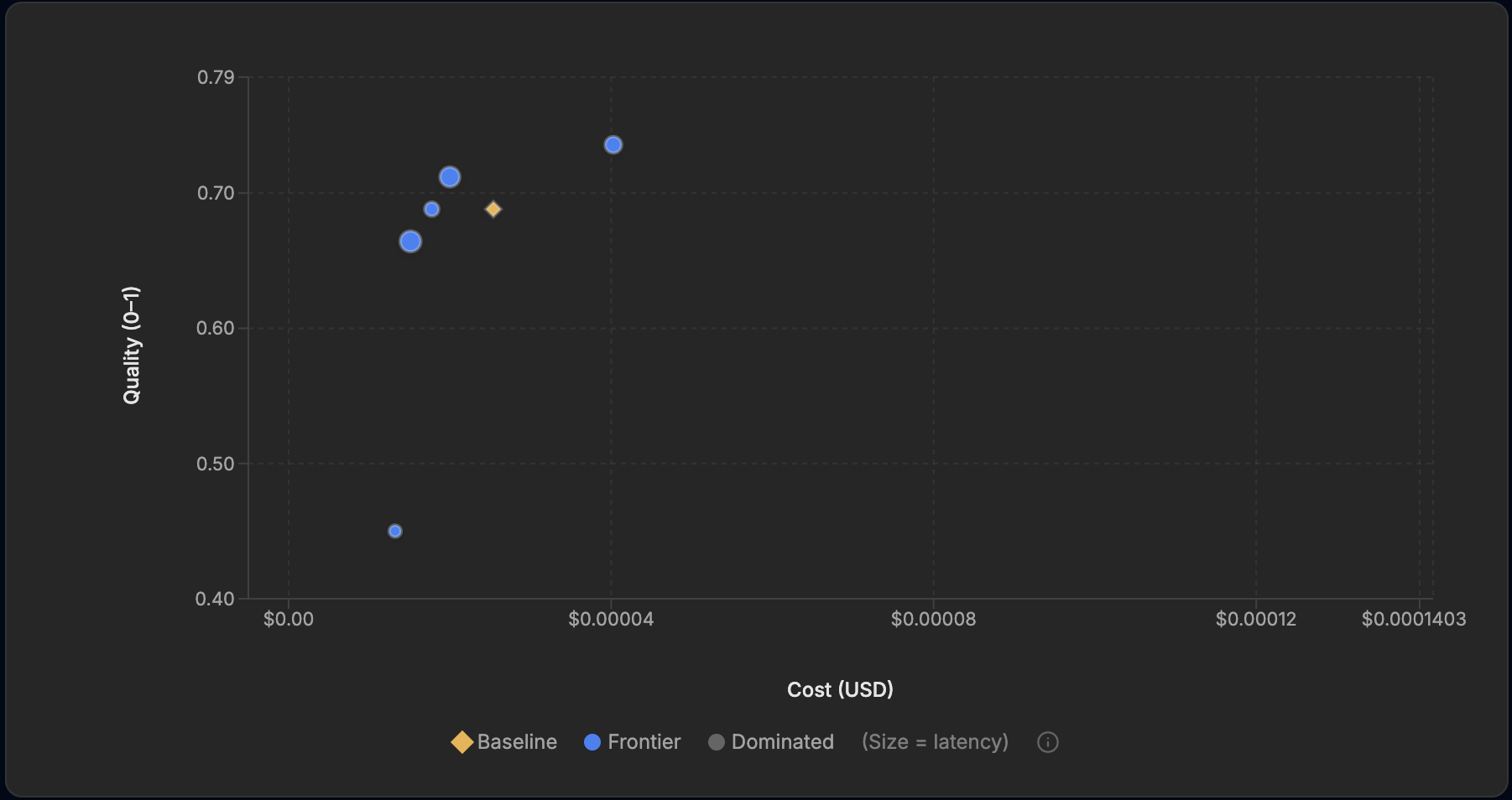
Cost-versus-quality chart for the Efficient run: five blue frontier points from 0.45 up to 0.74, with the gold baseline diamond at 0.69.

The Efficient run: five frontier points after five minutes of search. The blue point at the baseline's height but to its left matches the baseline's 69% for 30% less cost.
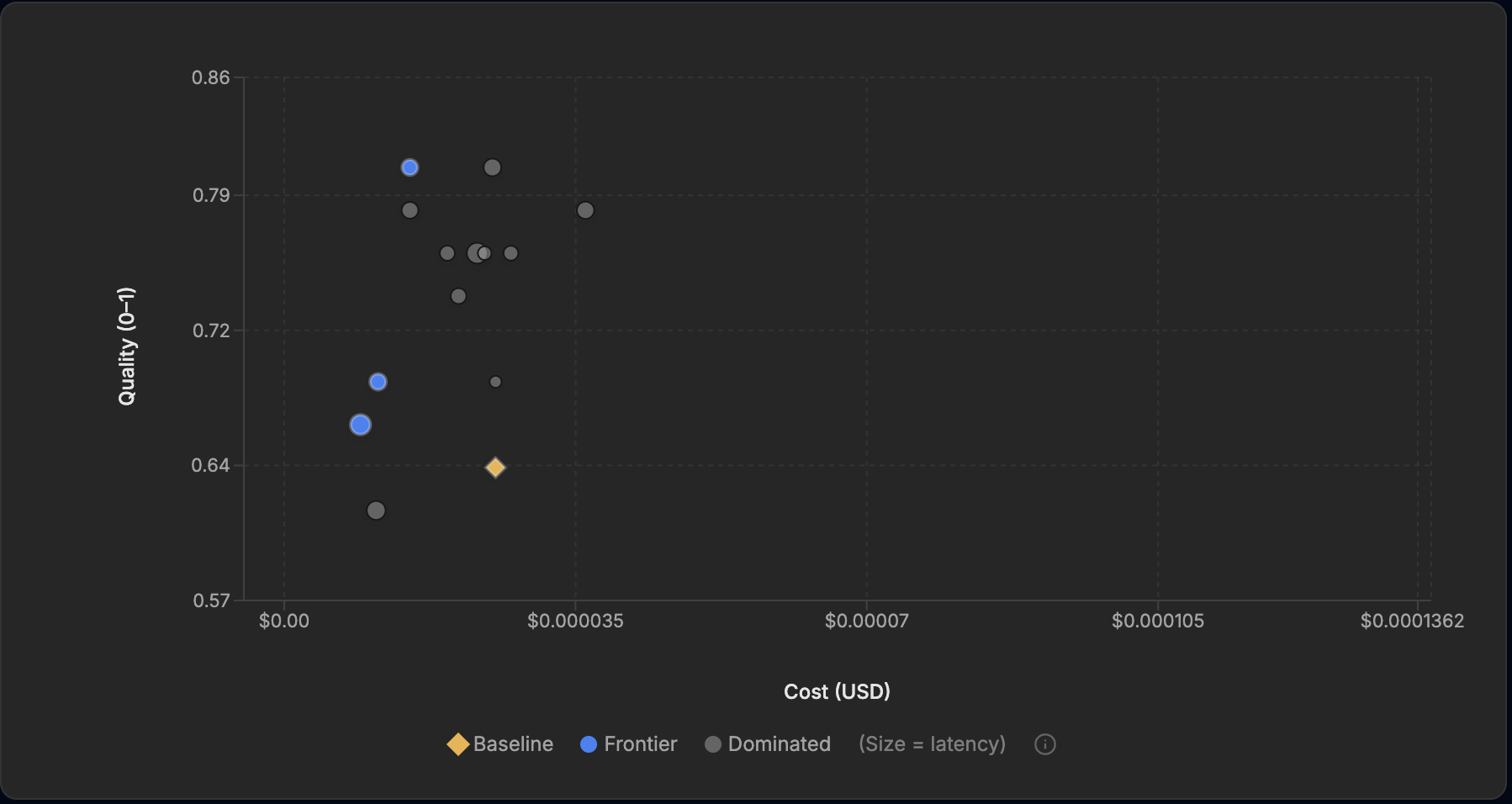
Cost-versus-quality chart for the Standard run: the gold baseline at 0.64, a blue frontier point at 0.81 above and to its left, and grey dominated points in between.

The Standard run. The top frontier point sits above and to the left of the baseline: 81% quality at 59% of the baseline's cost. Note the grey point at the same height further right — a second 81% prompt, dominated because it does the same job for two-thirds more money.
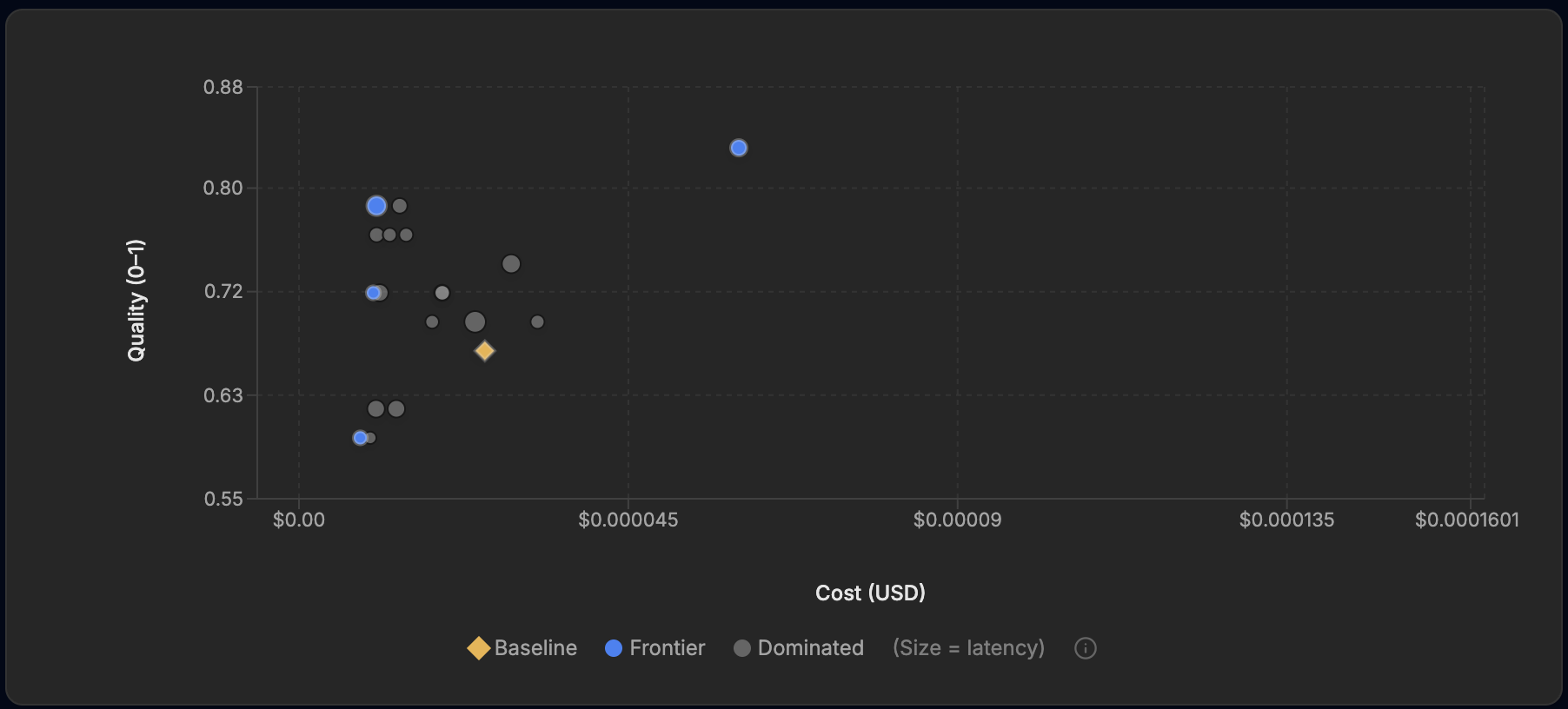
Cost-versus-quality chart for the Advanced run: a blue frontier point at 0.83 on the right, frontier points at 0.79, 0.72, and 0.60 on the cheap left side, and the gold baseline at 0.67.

The Advanced run. The 83% point pays for its accuracy out on the right; the quietly impressive point is the 79% one near the left edge, twelve points above the baseline at well under half its cost.

What EigenPrompt is optimizing

EigenPrompt is not training a model. It is searching over prompts. For each candidate prompt it runs the merchant-extraction task over the evaluation data, scores the output against the expected merchant, measures cost and latency, and keeps the prompts that nothing else beats on both quality and cost.

That surviving set is the Pareto frontier. A frontier point can be more accurate, cheaper, or faster than its neighbours, but no frontier point is strictly worse than another on every metric. This is why a good optimization run hands you a menu rather than a single magic prompt: you pick the point that fits your accuracy, cost, and latency budget, knowing what each step along the curve costs.

Step-by-step: the Standard run

Here is the whole Standard run, screen by screen, exactly as we configured it.

1. Define the task

Name the run, choose quantitative evaluation, and pick how outputs get scored. We chose Exact match: the model's answer either equals the label or it doesn't. The other match types (substring, fuzzy, JSON, LLM-judged) exist for tasks with softer edges; merchant resolution feeding a downstream system is not one of them.

EigenPrompt Task tab with the run name "Transaction merchant identification (entity resolution)", quantitative evaluation selected, Exact output match type, an optional optimization-goal field, and dataset source options.

The Task tab: quantitative evaluation, exact match, and a CSV upload as the dataset source.

2. Pick the models

Two separate decisions live here. The target model is the one you'll run in production, and the one every candidate prompt is scored against — here groq/openai/gpt-oss-120b. The optimizer models work behind the scenes, generating and refining prompt variations; we used cerebras/gpt-oss-120b and cerebras/zai-glm-4.7, weighted equally. Optimizing for the exact model you will pay for matters, because a prompt tuned on one model rarely transfers unchanged to another.

EigenPrompt LLM tab showing the target model groq/openai/gpt-oss-120b and two optimizer models, cerebras/gpt-oss-120b and cerebras/zai-glm-4.7, each weighted 50%, with a notice that saved keys need to be unlocked.

The LLM tab: one target model to optimize for, two optimizer models doing the rewriting.

Saved provider keys live in an encrypted vault, and unlocking them takes a vault passphrase that is deliberately not your account password. Before the run can call any provider, you unseal the keys:

Unlock API Keys modal asking for a vault passphrase to unlock stored API keys.

API keys stay encrypted until you unlock them with the vault passphrase.

3. Set the baseline prompt

Paste the prompt to beat. Template variables use {{VARIABLE}} syntax and map to dataset columns; this prompt has just one, {{INPUT}}.

EigenPrompt Prompt tab containing the baseline merchant-extraction prompt with an {{INPUT}} template variable.

The baseline prompt: plain instructions, one variable, the Unknown fallback spelled out.

4. Upload the dataset

The CSV needs a column per template variable plus an EXPECTED_OUTPUT column. The upload screen shows the parsed rows so you can sanity-check the mapping before spending anything — 140 rows, two columns, editable inline.

EigenPrompt Dataset tab showing entity_resolution.csv parsed into 140 rows with an INPUT column of raw descriptors and an Expected Output column of merchant names.

The Dataset tab: entity_resolution.csv, 140 rows, descriptors on the left, expected merchants on the right.

5. Answer a few questions — or don't

A short questionnaire lets you steer the optimizer, starting with what you actually care about: maximum accuracy, minimum latency, or a balance. Every answer is optional.

EigenPrompt Questions tab asking for the primary optimization objective, with an optional free-text answer field.

The Questions tab. Useful steering if you have opinions, skippable if you don't.

6. Choose a mode and set the caps

This is the dial the rest of this article turns on. Four modes trade search depth for cost: Efficient (~0.5x cost), Standard (base cost, the default), Advanced (3–5x, multiple strategies and a wider search), and Max (5–10x, the deepest search). We picked Standard and set a $25 cost cap and a 30-minute time cap, with batched evaluation (batch size 20) and quality analysis enabled.

EigenPrompt Config tab with Standard mode selected among Efficient, Standard, Advanced, and Max; a $25 max cost; a 30-minute max time; Turbo mode off; batched evaluation with batch size 20; and quality analysis on.

The Config tab: Standard mode, a cost cap, a time cap, and quality analysis switched on.

7. Review and launch

The review screen replays the whole configuration, then states the terms: this run uses one credit, and the improvement guarantee means no credit is spent if no better prompt is found.

EigenPrompt Review tab summarizing the run: base prompt, exact-match evaluation, Standard mode, target and optimizer models, batching, cost and time caps, 140-row dataset, and a note that one credit will be used with an improvement guarantee.

The Review tab. One credit, spent only if the optimizer actually beats your baseline.

8. Read the results

Forty-one minutes later the run came back with 48 candidates tested and a three-point frontier. The headline writes itself: the best prompt scored 81% at 59% of the baseline's cost, and the cheapest frontier prompt held 67%, still above the 64% baseline, at 36% of its cost.

Optimization Complete dialog over the frontier chart reporting the best prompt at 81% quality at 59% of base cost and the cheapest at 67% quality at 36% of base cost.

The completion summary: better and cheaper at the top of the frontier, much cheaper and still above baseline at the bottom.

Behind the chart is the full candidate table, one row per prompt, with quality, cost, p95 latency, and frontier status. It is worth a minute of scrolling: the top two rows both score 0.81, but only the $0.0000151-per-call one is on the frontier. The $0.000025 version is dominated — same accuracy, 66% more expensive.

Candidate prompt table listing prompt IDs with quality scores from 0.81 downward, per-call costs, p95 latencies, and Frontier or Dominated status labels.

The candidate table. Two prompts hit 0.81; the cheaper one makes the frontier, the other is dominated.

And here is what the search actually found. Before and after:

Before: the baseline, 64%

Identify the primary merchant from this bank transaction description.

Transaction: {{INPUT}}

Output only the canonical merchant name (e.g., 'Amazon', 'Starbucks', 'Netflix').
If no merchant can be determined, output 'Unknown'.

After: the best Standard prompt, 81%

Extract merchant from {{INPUT}}, normalize to official brand name. Output name only, or 'Unknown', no extra whitespace.

The winner is one line. Two phrases in it are doing the work. "Normalize to official brand name" tells the model to canonicalize rather than echo: DUNKIN #312456 BOSTON MA should come back as the brand, not the descriptor. And "no extra whitespace" guards the exact-match scoring against the dumbest possible way to lose a point. Because the prompt got shorter, every call also got cheaper. The cheapest frontier prompt goes further down the same path — Normalize {{INPUT}} to official brand name or 'Unknown'. — and holds 67% at about a third of the baseline's cost.

The Standard run's winning prompt is seventeen points more accurate than the baseline and 41% cheaper per call. Same run, same credit.

9. Inspect the misses

This is the part most optimization writeups skip, and it is where the run gets honest. Quality analysis produces two review tables: examples no candidate solved, and examples solved by fewer than 10% of the prompts tested.

Unsolved samples table with eight rows no candidate solved, showing the descriptor, the expected output, and the majority answer — for example AMZN Mktp rows expected Amazon Marketplace with majority answer Amazon.Low solve-rate table with eight rows solved by fewer than 10% of prompts, each showing the descriptor, expected output, majority answer, and a solve rate of 2% to 8%.

The post-run review tables: eight examples no candidate solved, eight more that fewer than one prompt in ten got right, each with the expected label next to the majority answer.

Read the rows and the misses sort into three kinds:

  • Granularity disputes. Three AMZN Mktp rows expect Amazon Marketplace; on all three, the majority answer was Amazon. The labels want Prime Video, YouTube Premium, and Apple TV+; the models keep reaching for the parent brand. Whether that's a model failure or a labeling decision is genuinely a question for your team, and you'd rather settle it before production than after.
  • Formatting and punctuation. The Baker's Dozen lost to The Bakers Dozen on an apostrophe; Mercado Libre lost to MercadoLibre on a space. And PANERA BREAD #789 is labeled Panera while the majority answer was Panera Bread — which is what the descriptor literally says. That label deserves a second look, and this table is what put it in front of us.
  • Genuine resolution failures. Remember the H&M purchase from the top of this article? No candidate solved it: for KLARNA* HMSVERIGE SE SEK the majority answer was Klarna, the payment rail instead of the merchant behind it — exactly the mistake this dataset exists to punish. The platform conventions tripped the models both ways, too: APPLE.COM/BILL DUOLINGO mostly came back Apple (the label wants Duolingo, the service), and POSTMATES*CHIPOTLE LA mostly came back Chipotle (the label wants Postmates, the platform). And ACH PAYROLL ADPFIDES 12345 mostly came back Unknown when the answer was ADP.

EigenPrompt doesn't decide which is which. It puts the stored label next to the consensus answer with a solve rate, and leaves the judgment to you. Some of these rows are prompt work still to do; some are label spec your team hasn't finished writing. Either way, the score's ceiling is now a finite, reviewable list instead of a mystery.

10. The numbers, all in one place

The run summary is the receipt: baseline 64%, best 81%, the cost figures for both, 48 candidates, three frontier points, 153 ms average latency on the winning prompt, and 40m 47s of wall-clock time. (About that 30-minute cap from step 6: it is a stop signal the search checks as it runs, and the wall clock also includes the post-run quality analysis.) Total API spend, target and optimizer models combined, was about 80 cents.

Run summary panel listing the run ID, target model groq/openai/gpt-oss-120b, optimizer models, 64% baseline quality, 81% best quality, cost per thousand requests for best and baseline prompts, the cheapest at-or-above-baseline prompt, 48 candidates tested, evaluation and optimizer costs, 40m 47s wall-clock time, latency figures, and 3 Pareto frontier points.

The Standard run summary. Every measured number in this article traces back to a panel like this one.

What changed from Efficient to Advanced

The three modes are the same machine at three throttle settings, and the runs behave accordingly.

Efficient is the five-minute, five-point probe. With 23 candidates it nudged the top score from 69% to 74% and matched the baseline's accuracy at 30% less cost. Its best prompt is recognizably a human style of prompt: a careful paragraph telling the model to ignore store numbers, addresses, and transaction metadata. For about $0.46 of API spend, it answered the question that matters before spending more: this prompt has headroom.

Standard is the workhorse, and the walkthrough above is the argument for it: 64% to 81%, with the winner cheaper than the baseline, in 41 minutes.

Advanced ran 116 candidates and found the best prompt of the series at 83%. It looks nothing like a prompt a person would write on the first try:

<context>Merchant Entity Resolution</context>

<task>Extract the canonical merchant brand name from the input.</task>

<input>{{INPUT}}</input>

<constraints>
- Map the input to the official, standard brand name.
- If the merchant is unrecognizable, return "Unknown".
- Maintain exact casing, spacing, and punctuation (e.g., "H&M", "Dunkin'", "Apple TV+", "Uber Eats", "Microsoft Azure", "Blue Bottle Coffee").
</constraints>

<output_format>
Brand name string only. No explanations, no quotes, no trailing punctuation.
</output_format>

Look at the constraint about casing and punctuation, then look back at the miss tables. H&M, Apple TV+, and Blue Bottle Coffee are names straight out of the Standard run's review queue. Nobody fed the optimizer those failures. The Advanced search rediscovered the pattern on its own, wrote a rule for it, and picked its own examples. That is what the 3–5x price tag buys: a search wide enough to converge on the structure of the task's errors.

The counterweight is cost. The 83% prompt is long, and at $0.0601 per thousand calls it runs about 2.4 times the baseline's price. But the same frontier carries the opposite trade: Get canonical merchant for {{INPUT}}; reply brand name or “Unknown”. scores 79% — twelve points above the Advanced run's baseline — at $0.0106 per thousand, about 42% of what the baseline costs. Everything here is fractions of a cent because the target model is cheap; the ratios are what carry to bigger models and bigger volumes.

The wider search paid off twice: a new top score at 83%, and a one-line prompt twelve points above baseline at less than half the baseline's cost.

Takeaways

  1. Entity resolution is resolution, not string cleanup. The merchant hides behind payment rails, BNPL providers, app-store billing, delivery platforms, and rebrands. A prompt that handles the easy rows tells you nothing about these.
  2. Exact match is unforgiving, and that's the point. Apostrophes, spaces, and sub-brands all cost real points. The miss tables turn each lost point into a reviewable row, and whether a label should say Panera or Panera Bread, Amazon or Amazon Marketplace, is a decision your team should make on purpose, not discover in production.
  3. The frontier matters more than the top score. The Standard run's value wasn't one 81% prompt; it was 81% at 59% of base cost and 67% at 36% of base cost in the same result, with the trade-off laid out for choosing rather than guessing.
  4. The mode dial is a budget decision, not a quality gamble. Efficient told us in five minutes the prompt had headroom. Standard banked most of the gain. Advanced bought the highest score plus the best cheap prompt. The improvement guarantee holds at every setting: no better prompt found, no credit spent.

Reproduce this run

Everything above is reproducible from the screenshots. Upload examples/datasets/entity_resolution.csv as the dataset, paste the baseline prompt from the dataset section above, score with exact match, set groq/openai/gpt-oss-120b as the target model, and run Efficient, Standard, and Advanced (we gave the Standard run a $25 cost cap and a 30-minute time cap). Your frontier will not match ours point for point (the baseline alone scored 69%, 64%, and 67% across our three runs), but the shape of the result will: a menu of prompts, a few of them better and cheaper than the one you started with, and a short list of rows telling you exactly where the remaining points went.